Set up wi-fi on your Nintendo DS
Set your Nintendo's Wi-Fi Connection, so you can go head-to-head against DS players across the world

Nintendo's Wi-Fi Connection enables you to play against DS owners around the world. Mario Kart DS and Tony Hawk's American Sk8land already support the feature in the UK; Animal Crossing, Tetris DS, Metroid Prime Hunters and Lost Magic are among those that will in the future.
 |
|
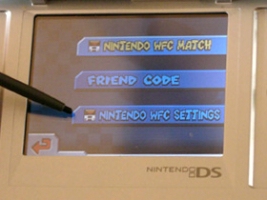
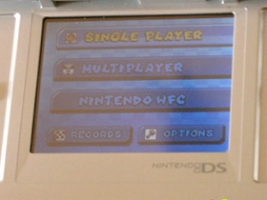
| To go online, you first need to get your hands on an online-enabled game. For example, here we're using Mario Kart DS. Switch on your DS, select Mario Kart DS, and go to the main menu screen. From here, select the Nintendo WFC option and then the Nintendo WFC Settings option. |
 |
 |
|
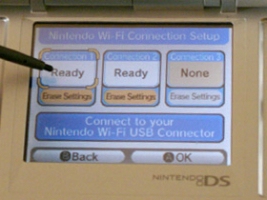
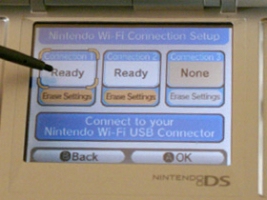
| Next, select Nintendo Wi-Fi Connection Settings. You can have three different connection settings, which you'd setup for different locations – one for home, say, and another for a local shop with an official Nintendo hotspot. When you first see them, all three connection buttons will read None, but when they've been connected to a network they will say Ready, as do two of the buttons shown here. |
 |
 |
|
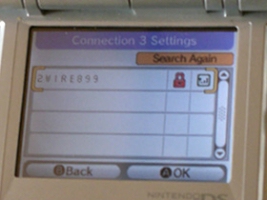
| The easiest way to get online is with a wireless network in your house. If you don't know if you've got one, just press any connection button that says None, and then select Search For An Access Point. You can use this option anywhere (whether in your house, or in a cafe or shop with a wireless network) and your DS will search out any available networks, listing all those it finds. In most cases, however, these will be locked, as shown by a red padlock. This means you need to get the key, usually a 10 digit number (also known as a WEP key) in order to log onto that network. |
 |
 |
|
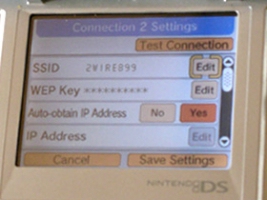
| If the network isn't locked, it won't show a red padlock and you can select it and go online straight away. If you do need a key, select the network and you'll be asked to enter the key (which you may need to retrieve from your home computer's settings). Once you've logged onto a network, you can select it and check its detailed settings. It's usually best to keep these on automatic. If you're having problems and you know what you're doing, however, you can manually set up the connection, but you'll need to know your IP address, subnet mask, gateway and DNS settings! |
 |
 |
|
| The other way to get online is with Nintendo's Wi-Fi USB Connector. You can do this if your home PC is connected to a broadband network by a cable but you don't have a wireless network. The connector costs £30, and it comes with a CD you install onto your PC (Windows only, so no Macs). Then plug the connector into one of your PC's USB slots, and use the registration software to allow your DS to log onto the PC's broadband network when you select the Nintendo's Wi-Fi USB Connector option on your DS. |
 |
 |
|
| That's it! You should now be able to start playing against other DS owners from around the world, including us (look out for nicknames with PG and our alien logo!) If you get stuck (particularly if you don't know your WEP key), check out Nintendo's official wi-fi connection website, www.nintendowifi.com, for details on retrieving it. Or else find out how to do more with your Nintendo DS. |
 |

Jon Jordan
A Pocket Gamer co-founder, Jon can turn his hand to anything except hand turning. He is editor-at-large at PG.biz which means he can arrive anywhere in the world, acting like a slightly confused uncle looking for the way out. He likes letters, cameras, imaginary numbers and legumes.