How to download more 100 Classic Books
Get onto the Nintendo Wi-Fi Connection

Okay, so it will probably take you a while to work your way through the complete library of Nintendo’s 100 Classic Book Collection. But, if you’re a fast reader - or just picky - there are extra books for you to access.
At the moment, there are 10 downloadable extras, plus you can download the popularity ranking of the 100 classics, which feeds into the searching and discovery options of the software.
In order to do this you will need: a DS (phat or lite), a copy of the 100 Classic Book Collection game cartridge and access to a wireless internet connection, either via a home or commercial wireless hub, or using Nintendo Wi-Fi USB Connector, which creates a wireless network via a PC that has a wired broadband connection.
This is required so you can connect to the Nintendo Wi-Fi Connection, which is Nintendo’s infrastructure for enabling multiplayer games and digital downloads.
The step-by-step to more Classic BooksStep 1: Select DS Wireless

From 100 Classic Book Collection’s start screen, you need to select the DS Wireless option with your stylus.
Step 2: Select Nintendo Wi-Fi Connection
To download a new book, you need to select the Nintendo Wi-Fi Connection option. The Local Wireless option is used to send (or receive) a trial version of 100 Classic Book Collection to another DS within a five metre distance.
Step 3: Select Download Books
Through this screen you can choose to download a new book, update the popularity ranking of the books, or check the settings of your DS when it comes to connecting to the Nintendo Wi-Fi Connection. Select Download Books.
If you need help with your settings, or you can't connect to the Nintendo Wi-Fi Connection, check out our How to Set up wi-fi on your Nintendo DS guide.
Step 4: Select Yes
next hit the 'Yes' button
Step 5: Nintendo Wi-Fi Connecting
This is the screen showing your DS is trying to connect to the NWC. The green box in the top right hand corner of the left hand screen, shows we have a good wireless connection. If it's a red box without any vertical bars, your DS can't connect to a wireless network and you'll need to tweak your settings.
Step 6: What books to download?
Once you’re connected, you can see how much space you have on your Bookshelf (i.e., how much available flash memory there is on the DS game cartridge) to download new books, as well as the number of books that are available to download from the server.
You can scroll down the list of available books using the slider on the right hand side of the right hand screen.
Step 7: Downloading (1)
To download a book, simply select it from the above screen, and then you will see this prompt, which checks that you want to download that particular title - which in this case is The Black Arrow. Select Yes.
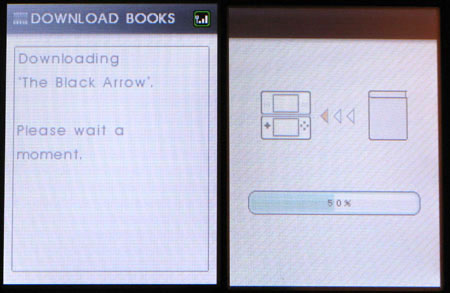
Then you will see this screen which has a loading bar to show how much of the book has been downloaded.
Step 9: Success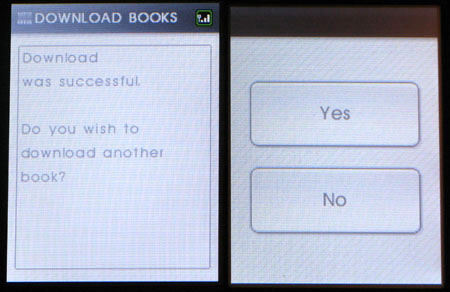
Once the book is successfully downloaded and saved to the game cartridge, you will be asked if you want to download another book.
Step 10: Updating Book Rankings.jpg)
As well as downloading new books, you can download book rankings, which tells you which are the most popular books. You get to this screen by following the steps 1 and 2.
Step 11: Downloading Book Rankings.jpg)
Select Update Ranking, and then you'll get the same 'Yes' prompt and connection screens as shown before in steps 4 and 5. Then you'll see this progress bar for the download of the ranking information.
Step 12: Success
This is the screen you'll see when you've successfully downloaded the book rankings.
Step 13: See Book Rankings (1)
If you then go back to the main menu screen (step 1), select the Book Guide option. You will then see this screen. Hit 'Ranking' and then you can see the overall popularity ranking for the 100 books - which is what you have just downloaded. The Quiz option gives you a choice of books based on a simple personality test.
Step 14: See Book Rankings (2)
The top ranked book at the moment is The Three Musketeers.
