• arrow
    LOG IN 
    • Log in using an option below.
         
      Forgot password?
      Login with Facebook
      Sign in with Twitter

  • REGISTER
ABOUT US
Contact Us Who Are We? Hall Of Fame Advertising With PG Games Archive
MORE PG SITES
PG.biz PG FRANCE PG GERMANY PG Game Guides PG GameHubs
MORE SM SITES
AppSpy Free App Alliance 148 Apps Android Rundown iPhone Quality Index iPad Quality Index Android Quality Index Swipe Magazine Best App Ever Awards Padvance GiggleApps
FREE STUFF
Competitions Free iOS Games iOS Price Drops
PARTNERS
Metacritic
GameRankings
Pocket Gamer on NewsNow
GamesTracker
dx.net
UK Mobile Pages Directory
Skinflint Price Comparison
 ANDROID HOW TO GUIDES
 How to play GBA games on Android - with the best GBA emulator for Android
Now you're playing with (32 bits of) power
Product: Emulation
 
Emulation Android, thumbnail 1
Did you know that your Android has the power to play Game Boy Advance games? With a few choice downloads and a little know-how, you can play Fire Emblem, Pokemon, or Mario Kart on your phone.

We scoured Google Play, searched the internet, and tried a handful of GBA emulators for Android. After a lot of testing (and a lot of Advance Wars), we think GBAoid is your best bet.

For one, it's completely free. Rival Visual Boy Advance has an almost identical set of features, but that one will set you back £2.99. GBAoid also has cheats, configurable controls (including for the Xperia Play), top-notch performance, and even the ability to fast-forward boring cutscenes.

Here's our guru guide to downloading GBAoid, installing the emulator, and loading up your favourite games.

Note: Pocket Gamer does not condone piracy, and offers this information for entertainment purposes only. Pocket Gamer also takes no responsibility if you follow this guide and manage to bugger up your phone in the process. That's on you, bro.

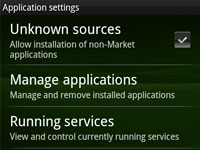
First things first, this emulator is not available on Google Play, so you'll need to give your Android device permission to install apps from outside this marketplace.

To do this, enter the 'Settings', tap 'Applications', and tick 'Unknown Sources'.
how-to-gba-android-01


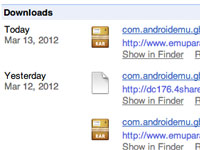
Download GBAoid. You can find the APK file here. You can either download it on your PC and transfer it across, or download it directly on your phone.

If you download it on your PC, plug your Android in via the USB cable and find the phone's SD card under 'My Computer' on Windows or 'Devices' on OS X. Unzip the file and drag the APK file over.

Then, use a file manager app (we recommend AndroZip) on the phone to find the GBAoid APK and tap 'Install' to, erm, install it.

If you download it directly to the phone, you'll need a ZIP file manager (the free AndroZip is the one you want, again) to extract the APK file and install it.
how-to-gba-android-02


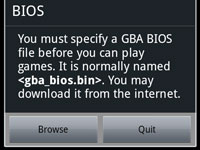
Phew! Done! Okay, the next step is grab a GBA BIOS file. This code is copyrighted to Nintendo, so to avoid getting in a legal bind, the developer makes you find, download, and install it yourself.

For the same reason, we won't give you an exact location. But, a little Googling for "gba_bios.bin" will point you in the right direction.

Either download directly on the phone, or get it on your PC and transfer it across using USB. Then, load GBAoid. It will ask you to find the BIOS - hit 'Browse', and select the file you just acquired.
how-to-gba-android-03


Almost there. We need a game now. These are called ROMs and are very easy to find. You'll need to source a file off of the Internet (either on your phone or a PC) - but we won't be giving you exact locations of any naughty files.

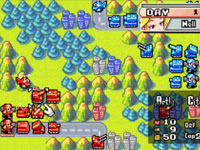
Drop the ".GBA" file in a sensible place on your SD card (we say: make a folder called "GBA Roms" on your card). Now, open GBAoid again, find the ROM, and tap it to play. If all goes well, the game should start playing. Huzzah!

You can control it with the virtual buttons, or hit the 'Menu' button and choose 'input settings' to configure a gamepad or the Xperia Play's controls.
how-to-gba-android-04


Reviewer photo
Mark Brown 14 March 2012
Have your say!  
Post a comment - Please log in to leave a comment
Pocket Gamer Biz     PG Login
Login with Facebook Sign in with Twitter
Show: Latest | Oldest
Joined:
May 2013
Post count:
1
Eric Mark | 13:21 - 9 May 2013
Sweeet!! I've been trying to play Pokemon emerald on my phone but couldn't find out what is wrong but simply, all I have to do is download a GBA BIOS file. phew!! thanks for this review. . .
Joined:
Mar 2013
Post count:
1
@LuigiRosee | 10:50 - 17 March 2013
cant get any of this to work my phone (SonyXperiaMiro) does simply not work with emulators i think i also had tigergba and that wouldnt find the roms i was putting on the SD card and this i have an option to install the file andriodzip unpacks the file and not much else happens
Joined:
Oct 2012
Post count:
1
arquillos | 13:42 - 30 January 2013
Very nice review!
On my tests using a JXD s5110 the best GameBoy Advance emulator is GameBoid. You can read it on my blog: retro-android.blogspot.com.es/2013/01/android-gameboy-advance-emulation-using.html
Joined:
Aug 2012
Post count:
1
Vern Cruz | 16:46 - 13 August 2012
thanks man! imo gba games > android games, for kids of y2k >:-)
Joined:
Jul 2012
Post count:
1
TehSamm | 18:49 - 10 July 2012
Awesome tutorial! Thanks a bunch :)
Joined:
Jul 2012
Post count:
1
soccerftw | 20:00 - 6 July 2012
Where do you put the apk file in the sd card. What folder?
Joined:
Jun 2012
Post count:
1
ghemz0005 | 20:21 - 19 June 2012
God i need help,. why cant i get it done and working??? my android phone is a Lynx 3D NTT Docomo. model number of my phone was SH-03C,... i cant run the emulator nor the andoidzip. i followed every step 1 to 4 and when i go check my phone,... nothing happens... everyone please help,... a lot of thanks in advance,.........
Joined:
Jun 2012
Post count:
1
quickscope24 | 00:43 - 16 June 2012
Hey guys, if you go to this link, and you read what the first comment says, it should help you a lot. Hope I helped.


http://www.emuparadise.me/Nintendo_Gameboy_Advance_Emulators/Android/GBAoid/314
Joined:
Jun 2012
Post count:
1
flying_anvil | 16:53 - 14 June 2012
I cant seem to get anything to work i fallowed all the instructions specified with no results why is this so irritating. Ive tried several emulator programs and i cant get anything going.
Joined:
May 2012
Post count:
2
axel_blaze | 10:12 - 23 May 2012
how to enter cheat code
JOIN THE DISCUSSION: 19 comments >>
LATEST COMMENTS
LATEST NEWS
LATEST VIDEOS
VIDEO REVIEWS
LATEST SCREENS