• arrow
    LOG IN 
    • Log in using an option below.
         
      Forgot password?
      Login with Facebook
      Sign in with Twitter

  • REGISTER
New to Pocket Gamer? Start here!
ABOUT US
Contact Us Who Are We? Hall Of Fame Advertising With PG Games Archive
MORE PG SITES
PG.biz PG FRANCE PG GERMANY PG Game Guides PG GameHubs
MORE SM SITES
AppSpy Free App Alliance 148 Apps Android Rundown iPhone Quality Index iPad Quality Index Android Quality Index Swipe Magazine Best App Ever Awards Padvance GiggleApps
FREE STUFF
Competitions Free iOS Games iOS Price Drops
PARTNERS
Metacritic
GameRankings
Pocket Gamer on NewsNow
GamesTracker
dx.net
UK Mobile Pages Directory
Skinflint Price Comparison
 BADA HOW TO GUIDES
 How to download games to your phone via Kies
From PC to Wave
Product: Kies | Publisher: Samsung
 
Kies Bada, thumbnail 1
There are two ways to download games and apps from the Samsung Apps store.

You can either do it directly on your phone or via the Kies desktop utility for Windows PCs.

Despite its silly name, Kies is quicker - assuming your PC's internet connection is faster than your phone's - and also enables you to store, manage, and organise your downloads in a similar manner to Apple's iTunes.

Of course, your Samsung Apps's account detail can be shared between PC and phone. 


If you don't yet have Kies, check out our initial guide.

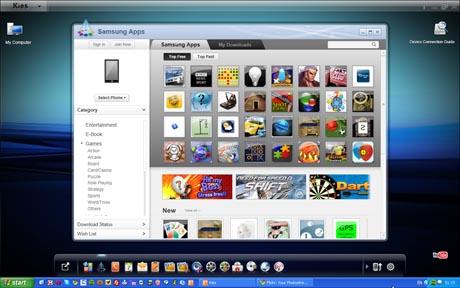
Otherwise, boot up Kies and then click on the Samsung Apps icon (second from left on the bottom widgets menu) and you'll see this view.


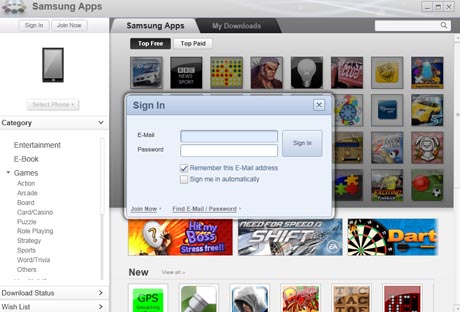
If you're not yet registered on Samsung Apps, fill in your email and password to get your account up and running and logged in.

You can check the two boxes if you want the system to automatically enter your details for future visits.


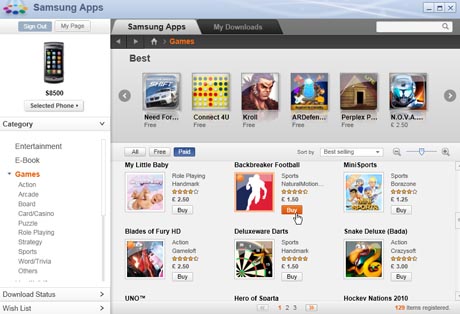
You can search for games (and other apps) via the free or paid tabs, or the search box.

In this case, I'm going to buy and download NaturalMotion's Backbreaker Football.


The details of the purchase are then shown for you to confirm. You'll also receive an email receipt. 
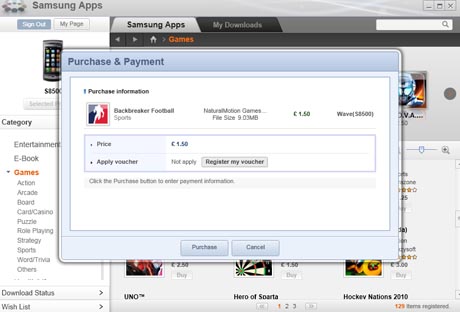


Samsung Apps (via Kies) requires a credit card to be entered for purchases - just like the Apple App Store and iTunes then.


When you switch to the My Downloads tab, you can see what games and apps you've already downloaded.

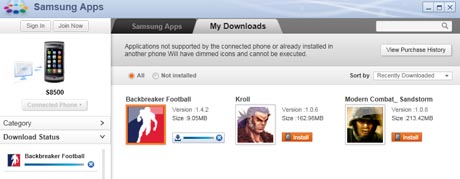
You can see how your download is progressing via the Download Status menu on the left hand side. In this screenshot, you can see Backbreaker Football has been downloaded to my PC but not installed.


To install the game, you have to connect your phone (I'm using a Wave) via USB. You will have to end all running applications on your phone to do this.

Hold down the main Menu button (the big diamond-shaped one on the Wave) and select the prompt to do this.

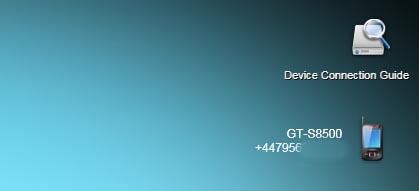
You will see your phone and number displayed on the right hand side of the screen in Kies when it's connected. (I've partially obscured my number because as much as I like you, I don't want you to phone me.)


To transfer a game, click on the orange Install button. For some reason, this Install button is displayed even for games you've already installed on your phone but you can use the Not installed option to explicitly see what has and has not been installed.


Clicking on Install, the progress of the transfer is shown via the blue bar.


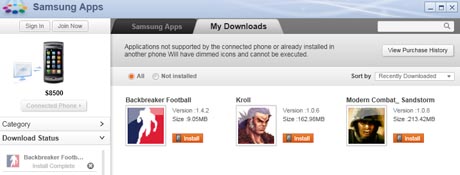
When complete, the orange Install button will remain but the download status in the left hand column will be listed as Install Complete, and more importantly, I now have Backbreaker Football on my phone. 


Reviewer photo
Jon Jordan 4 September 2010
Have your say!  
Post a comment - Please log in to leave a comment
Pocket Gamer Biz     PG Login
Login with Facebook Sign in with Twitter
Show: Latest | Oldest
Joined:
Aug 2012
Post count:
1
Shrideesh Nair | 18:02 - 25 August 2012
karma explain to me the first step tat u wrote in tat post of urs fast plsssssssssssssssssssssssssssssssssssssssssssssssssssssssssssssssssssssssssssssss..................................
Joined:
May 2012
Post count:
1
ronnie61 | 18:53 - 19 May 2012
thanks karma..it worked on mine
Joined:
Apr 2012
Post count:
1
mabouhager | 09:00 - 27 April 2012
hi
through sansung apps it can`t identify my mobile though it identified it through kies so how can i install what i downloaded without connecting mobile or where are my downloads saved on pc to transform it to my phone then install them on mobile
Joined:
Apr 2012
Post count:
1
Karma | 12:46 - 11 April 2012
This is what you need to do in order to fix the missing samsung aps store bugg

Do it this way.
(Pre-step : Start > Run > type "regedit" press enter)

1. From windows command, enter regedit.
2. Expand HKEY_CURRENT_USER/Software/SAMSUNG
3. Now double-click folder “Kies2.0″ .
4. On right-hand side of window, under Name column, look for “Region” (5th from
bottom)
5. Right-click on “Region” and select “Modify”. Change the current region US to yours (or change to) UK. 6. That’s all. The new kies will work 100% with the latest samsung apps store UI.
Joined:
Jan 2012
Post count:
1
scotsoham@yahoo.co.in | 05:58 - 12 January 2012
my kies dont have tht samusng apss icon under the store.........plzz help me!
Joined:
Nov 2011
Post count:
1
Avigan | 14:32 - 29 November 2011
can i download with my main balance when my phone is connected
Joined:
Sep 2011
Post count:
1
mtboss | 11:51 - 19 September 2011
i also do not have credit card and i simply want to download free games via kiewhat should i do then?
Joined:
Sep 2011
Post count:
1
mayank4321 | 04:44 - 11 September 2011
how to download android games from kies? plz tell even if it requires forcing kies to do so
Anonymous | 23:27 - 5 February 2011
I have installed all Kies programs from disks 1 and 2 and restarted computer but the apps icon is missing. I have gone into settings then widget selection but the icon is still not there. What do I do?
Anonymous | 08:51 - 8 October 2010
What if i dont have credit card arent there any other mode of payment through sim or debt card or simply cam we download paid games for free
JOIN THE DISCUSSION: 10 comments >>
LATEST COMMENTS
LATEST NEWS
LATEST VIDEOS VIDEO REVIEWS
LATEST SCREENS